



Understanding Error Code Delta Pro Ultra: Causes and Solutions
Error code Delta Pro Ultra is a specific error message that users may encounter while using various software applications or devices. This error typically indicates a malfunction or incompatibility issue, affecting functionality. Understanding this code is crucial for troubleshooting and resolving the underlying problems.
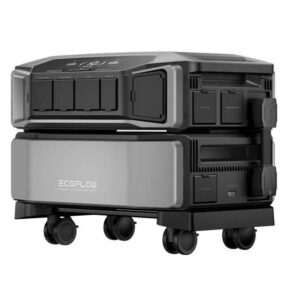
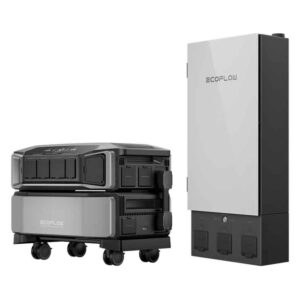
The EcoFlow Delta Pro Ultra is a cutting-edge portable power station designed to meet the energy needs of various applications. Whether you are planning for an outdoor adventure, or an emergency backup, or need a reliable power source for professional use, this device offers unparalleled performance and versatility.
Key Features EcoFlow DELTA Pro Ultra
The EcoFlow Delta Pro Ultra stands out with its impressive battery capacity and power output. It boasts a 3600Wh capacity and can deliver up to 3600W of continuous power, making it suitable for powering heavy-duty appliances and tools. Additionally, it supports multiple charging methods, including solar, AC, and car charging, ensuring you have power whenever and wherever you need it.
Error Code List
| Error code | Error description | Cause | Suggestion |
|---|---|---|---|
| 66 | Communication failure with EcoFlow Smart Home Panel 2 | Internal communication failure. | Contact after-sales service if a forced shutdown doesn’t work. |
| 94 | Communication failure | The EV charger hasn’t received data from DELTA Pro Ultra after 5 seconds. |
|
| 103 | DC output port overcurrent | DC output port short-circuits or overloads. |
|
| 171 | Low-PV input overvoltage | The supply voltage of connected solar panels is too high. | Ensure that solar panels are in good condition. |
| 177 | Weak sunlight protection for Low-PV input | The connected solar panel(s) have insufficient power. | When there is sufficient sunlight, re-connect the solar panels. |
| 274 | AC charging input port overcurrent | Power of Loads higher than specifications. | Lower the output load and plug in the AC charging cable again. |
| 297 | L2 bypass overload | Power of loads higher than specifications. | Lower the output load and plug in the AC charging cable again. |
| 402-408 | AC output socket 1-7 overload | AC output socket overload. | Ensure the loads connected to the ports meet the specs. |
| 433 | Current overload | Overcurrent at the output port of the EcoFlow 50 Amp Hub. | Replace with loads of lower power or reduce the number of loads. |
| 457 | Weak sunlight failure | Insufficient sunlight. |
|
| 509 | High discharging temperature | The battery temperature is too high. | Charging can be resumed automatically after the battery temperature cools down. |
| 510 | Low discharging temperature | The battery temperature is too low. | Charging can be resumed automatically after the battery temperature rises. |
| 511 | High charging temperature | The battery temperature is too high. | Charging can be resumed automatically after the battery temperature cools down. |
| 512 | Low charging temperature | The battery temperature is too low. | Charging can be resumed automatically after the battery temperature rises. |
| 523 | Charging Level protection | ||
| 524 | Discharging level protection |
Common Causes of Error Code Delta Pro Ultra

Several factors can lead to the appearance of the error code Delta Pro Ultra. These may include outdated software versions, corrupted files, or issues with system configurations. Additionally, hardware compatibility problems can also trigger this error, especially in complex systems with multiple components.
How to Fix Error Code Delta Pro Ultra
To resolve the error code Delta Pro Ultra, users can take several steps. First, ensure all software is updated to the latest versions to eliminate compatibility issues. If the error continues, consider running a diagnostic check to identify corrupted files. Resetting system settings to default can also help in resolving any misconfigurations. In cases where these solutions fail, reaching out to technical support may be the best course of action.
You Might Also Like
- Error Code Bluetti AC200L
- Anker F3800 and EcoFlow DELTA Pro Ultra Comparison
- Goal Zero Yeti Review
- Jackery Power Station Comparison
- Jackery Power Station Collections 2024